# HyperSwap // GPU Program Swapper & Memory Orchestrator
[](https://fastapi.tiangolo.com)
[](https://modelcontextprotocol.io)
[](https://developer.nvidia.com/cuda-zone)
[](https://ubuntu.com)
**HyperSwap** is an ultra-low-latency VRAM arbitrator, host RAM cache pre-warmer, dynamic hardware overclocker, and real-time telemetry dashboard designed specifically for Linux deployment machines that simultaneously host **Ollama LLM workloads** and **ComfyUI Diffusion pipelines** on a single NVIDIA GPU.
---
## Real-Time Telemetry & Control Dashboard
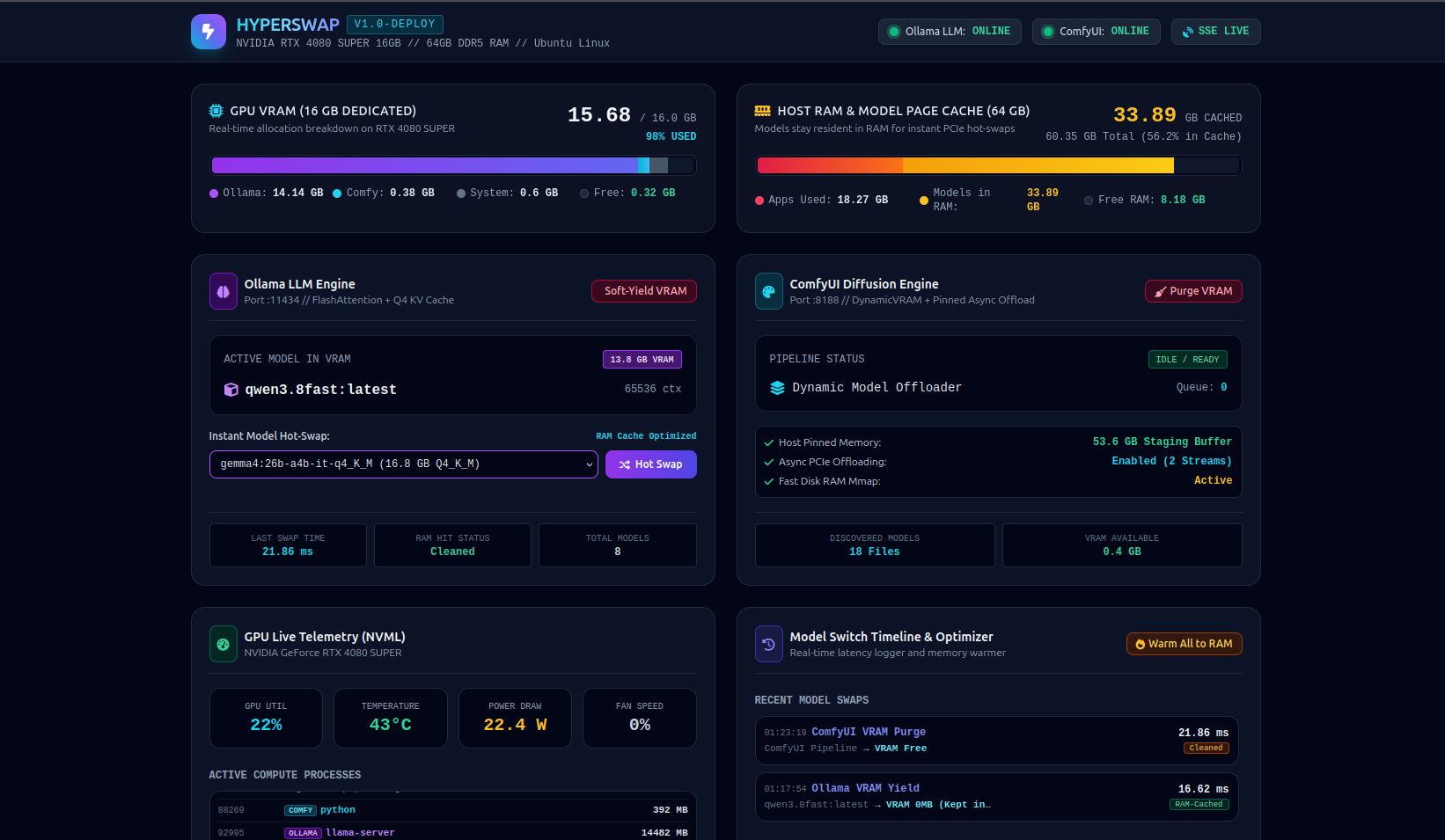
*The HyperSwap live dashboard running on `:9090`, demonstrating real-time VRAM allocation tracking (Ollama 14.14 GB, ComfyUI 0.38 GB, Desktop 0.6 GB), 33.89 GB of models resident in 64GB host RAM cache, live dual-axis memory charts, hardware fan control, and sub-25ms model VRAM purges and soft-yields.*
---
## 1. Feature Matrix
### ⚡ Bidirectional VRAM Hot-Swapping & Arbitration
* **Sub-25ms Soft-Yield**: Instantly releases Ollama VRAM allocations (`keep_alive: 0`) down to 0 MB when ComfyUI needs to run diffusion workloads without evicting weights from system RAM.
* **Auto-Purge for ComfyUI**: Automatically purges diffusion pipeline checkpoints and VRAM buffers when an image/video generation job finishes, releasing 100% of VRAM back to Ollama.
* **Real-Time ComfyUI WebSocket & Watchdog Listener**: Subscribes directly to `ws://127.0.0.1:8188/ws` and runs a 300ms watchdog loop to detect prompt queueing and node execution in real time.
* **Process-Level VRAM Attribution**: Live NVML process inspection attributes exact GPU memory usage across Ollama (`llama-server`), ComfyUI (`python`), and Desktop display servers (`gnome-shell`, `Xorg`).
* **Hot-Swap Transition History**: Circular buffer logs all model switch events, swap durations (in ms), tokens/sec throughput, and RAM cache hit status (`RAM Cache Hit ⚡` vs `Cold Disk Load 💾`).
### 🧠 64GB Host RAM Cache & Page Pre-warmer
* **Zero-Latency Model Discovery**: Automatic cataloging of all local Ollama models (`/usr/share/ollama/.ollama/models`, `~/.ollama/models`) and ComfyUI model directories (`checkpoints`, `diffusion_models`, `unet`, `vae`, `clip`, `loras`, `controlnet`).
* **POSIX `fadvise` & Pinned Pre-warmer**: Pre-faults multi-gigabyte GGUFs and Safetensors into the Linux OS Page Cache so that reloading models across PCIe 4.0 x16 runs at ~31.5 GB/s (sub-second VRAM loads).
* **Granular Pre-warming Controls**: Pre-warm all discovered models in bulk or target individual models/safetensors on demand.
* **Memory Telemetry**: Real-time breakdown of Total Host RAM, Applications Memory, Active Model Page Cache, Free Memory, and Cache Residency Ratio.
### 🎛️ Dynamic Overclocking & Thermal Management
* **Workload-Aware Overclock Profiles**:
* **`ollama` Profile (Memory-Bandwidth Bound)**: Max 370W power limit, +150 MHz Core Offset, +825 MHz Memory Offset, and 100% fan speed for maximum prompt eval / generation bandwidth.
* **`comfy` Profile (Compute Bound)**: Max 370W power limit, +100 MHz Core Offset, +500 MHz Memory Offset, Core Clock locked to 2900–3105 MHz, and 75% fan speed for maximum diffusion compute.
* **`balanced` Profile (Stock/General Purpose)**: Unlocked 370W power limit with stock dynamic boost curves and automatic fan control.
* **Hardware Actuation Hierarchy**:
* Level 1: Power Limit Control (`nvidia-smi -pl 370`).
* Level 2: Core & Memory Clock Locking (`nvidia-smi -lgc` / `-lmc`).
* Level 3: Clock Offsets via headless X display (`:8`) with Coolbits support (`nvidia-settings`).
* **Hardware Fan Control**: Switch between `auto` and `manual` PWM control (30%–100%) with synchronized dual-fan actuation (`[fan:0]` and `[fan:1]`).
* **Automated Lockstep Profile Switching**: AutoArbitrator automatically switches hardware profiles in lockstep with the active workload (`comfy` on generation start, `ollama` on completion).
### 📊 Real-Time Web Telemetry Dashboard (`:9090`)
* **Live Hardware Telemetry**: GPU utilization %, GPU temperature (°C), power draw (W), fan speeds (%), and graphics/memory clock frequencies (MHz).
* **Live Dual-Axis Time-Series Chart**: Real-time graphical visualization of VRAM usage (GB) and Host RAM Cache (GB) with zero frontend polling overhead.
* **Interactive Control Center**: Trigger model hot-swaps, soft-yields, cache pre-warms, fan adjustments, and benchmarks directly from the web interface.
* **Server-Sent Events (SSE)**: Pushes unified 1Hz telemetry updates via `GET /api/stream`.
### 🤖 Model Context Protocol (MCP 2.0) Server
* **12 Native Agentic Tools**: Allows AI agents (Antigravity CLI, Claude Desktop, Cursor) to manage GPU resources, trigger model hot-swaps, tune fan curves, and inspect telemetry.
* **3 Live MCP Resources**: Exposes live metrics, model catalogs, and switch logs as streamable resources (`gpu://metrics/live`, `gpu://models/catalog`, `gpu://history/switches`).
* **Dual Transport Support**: Run via standard input/output (`--stdio`) or network Server-Sent Events (`--sse --port 8001`).
### ⏱️ Automated Latency & Throughput Benchmark Engine
* Conducts automated round-trip model switching benchmarks to measure transition latency, model load time, tokens per second, and RAM cache effectiveness.
---
## 2. Architectural Overview
```mermaid
flowchart TD
subgraph HostRAM["64 GB Host System RAM (Page Cache & Staging Buffer)"]
OllamaGGUFs["Ollama GGUF Weights
(Qwen, Gemma, Nemotron)"]
ComfySafetensors["ComfyUI Safetensors & VAEs
(Wan2.1, Flux, SDXL)"]
end
subgraph GPU["NVIDIA GeForce RTX 4080 SUPER (16 GB VRAM)"]
direction LR
ActiveLLM["Active LLM
(0–15 GB VRAM)"]
ActiveDiffusion["Active Diffusion Pipeline
(0–15 GB VRAM)"]
end
subgraph Orchestrator["HyperSwap Control Plane (:9090)"]
REST["REST API & OpenAPI Docs"]
MCP["Model Context Protocol (MCP 2.0)"]
SSE["1Hz Real-Time SSE Stream"]
Arbitrator["VRAM Arbitrator (15ms Soft-Yield)"]
Overclock["Overclock & Fan Manager"]
Warmer["Page Cache Pre-Warmer"]
end
HostRAM <== "PCIe 4.0 x16 Bus (~31.5 GB/s Hot-Swap)" ==> GPU
Orchestrator --> GPU
Orchestrator --> HostRAM
```
### The Physics of Sub-Second Switching
* **Host RAM as Staging**: Active LLMs and diffusion checkpoints remain resident in the 64GB Linux Page Cache.
* **PCIe 4.0 x16 Hot-Swapping**: Transferring weights across PCIe 4.0 x16 achieves **~31.5 GB/s** bandwidth, reducing model loads from 30+ seconds (disk) to **under 1.5 seconds**.
* **Soft-Yielding**: Dropping Ollama's VRAM allocation via `keep_alive: 0` takes **~15ms** while preserving the weights in host RAM.
---
## 3. REST API Reference
The HyperSwap server runs on port `9090` by default. Interactive OpenAPI/Swagger docs are available at `http://localhost:9090/docs`.
### Telemetry & Hardware Endpoints
| Endpoint | Method | Description |
| :--- | :--- | :--- |
| `/api/stats` | `GET` | Complete unified JSON snapshot of hardware sensors, VRAM breakdown, host RAM, Ollama status, ComfyUI queue, and switch logs. |
| `/api/gpu` | `GET` | NVIDIA GPU sensors (utilization %, temperature, power draw in Watts, fan speeds, clocks, and active PIDs). |
| `/api/memory` | `GET` | Precise `/proc/meminfo` metrics (Total, Used, OS Page Cache containing models, Free memory). |
| `/api/gpu/fan` | `GET` | Current GPU fan mode (`auto` vs `manual`), target speed %, and live fan RPM/PWM status. |
| `/api/gpu/fan` | `POST` | Sets GPU fan speed mode (`auto` or `manual`) with target speed % (30–100%). |
| `/api/overclock` | `GET` | Active overclock profile, configured profiles, GPU clock limits, and fan status. |
| `/api/overclock/apply` | `POST` | Applies a named profile (`ollama`, `comfy`, `balanced`). |
| `/api/overclock/profile` | `POST` | Creates or updates an overclock profile configuration. |
| `/api/stream` | `GET` | Server-Sent Events (SSE) stream pushing full telemetry updates at 1Hz (`text/event-stream`). |
### Model Orchestration & Hot-Swap Endpoints
| Endpoint | Method | Description |
| :--- | :--- | :--- |
| `/api/switch-model` | `POST` | Hot-swaps the active Ollama LLM in VRAM and tracks transition timing. |
| `/api/free-vram` | `POST` | Instructs Ollama to soft-yield VRAM down to 0 MB in ~15ms while retaining RAM cache. |
| `/api/comfy-free` | `POST` | Instructs ComfyUI to purge loaded diffusion weights and VRAM cache. |
| `/api/warm-all` | `POST` | Pre-faults all installed Ollama models and ComfyUI Safetensors into the Linux page cache. |
| `/api/warm-model` | `POST` | Pre-warms a specific model or file into RAM. |
| `/api/benchmark` | `POST` | Runs an automated back-and-forth model swap benchmark and calculates average latency. |
---
## 4. Model Context Protocol (MCP 2.0) Reference
HyperSwap includes a native **MCP 2.0 server** (`mcp_server.py`) exposing orchestration and telemetry tools to AI agents.
### MCP Tools List
| Tool Name | Parameters | Description |
| :--- | :--- | :--- |
| **`get_gpu_status`** | *None* | Live NVIDIA GPU hardware telemetry, VRAM breakdown, temps, power, fan %, and PIDs. |
| **`get_gpu_fan_status`** | *None* | Current GPU fan mode (`auto`/`manual`) and target fan percentage. |
| **`set_gpu_fan_speed`** | `mode` (str), `percent` (optional int) | Sets fan speed mode (`auto`\|`manual`) and target PWM % (30–100%). |
| **`get_host_memory_status`** | *None* | 64GB host RAM breakdown, active page cache size, and cache ratio. |
| **`switch_ollama_model`** | `model_name` (str), `keep_alive` (str) | Hot-swaps active LLM in VRAM, measures latency (ms) and tokens/sec. |
| **`soft_yield_ollama_vram`** | `model_name` (optional str) | Yields Ollama VRAM to 0 MB in ~15ms while keeping model weights in RAM cache. |
| **`purge_comfyui_vram`** | *None* | Purges loaded diffusion models from ComfyUI pipeline VRAM. |
| **`prewarm_all_models_to_ram`** | *None* | Faults all local LLM and diffusion checkpoints into Linux OS page cache. |
| **`prewarm_single_model`** | `model_name` (optional str), `filepath` (optional str) | Pre-warms a single GGUF or Safetensors file into RAM. |
| **`list_available_models`** | *None* | Lists all installed Ollama models and discovered ComfyUI Safetensors on disk. |
| **`get_switch_history`** | `limit` (int, default 20) | Retrieves recent switch events, millisecond latencies, and RAM hit status. |
| **`run_model_switch_benchmark`**| `iterations` (int, default 2) | Automated round-trip latency benchmark between installed models. |
### MCP Resources List
* `gpu://metrics/live`: Real-time snapshot of GPU sensors and RAM page cache.
* `gpu://models/catalog`: Catalog of all discovered GGUF and Safetensors models.
* `gpu://history/switches`: Event log of recent model transitions and swap speeds.
---
### MCP Client Configurations
#### Antigravity Configuration (`~/.gemini/antigravity-cli/mcp_config.json`)
```json
{
"mcpServers": {
"hyperswap": {
"command": "/home/drjones/comfy-mcp-venv/bin/python",
"args": ["/home/drjones/unified-model-manager/mcp_server.py", "--stdio"]
}
}
}
```
#### Claude Desktop Configuration (`claude_desktop_config.json`)
```json
{
"mcpServers": {
"hyperswap": {
"command": "/home/drjones/comfy-mcp-venv/bin/python",
"args": ["/home/drjones/unified-model-manager/mcp_server.py", "--stdio"]
}
}
}
```
---
## 5. Linux Kernel & Host Tuning
To ensure that model weights remain permanently in RAM without kernel eviction:
```bash
# Set CPU scaling governor to performance
sudo cpupower frequency-set -g performance
# Configure sysctl optimizations in /etc/sysctl.d/99-hyperswap.conf
cat << 'EOF' | sudo tee /etc/sysctl.d/99-hyperswap.conf
# Retain model file cache aggressively in RAM
vm.vfs_cache_pressure = 50
# Prevent swapping cached models
vm.swappiness = 10
# Support large memory maps for high-parameter models
vm.max_map_count = 1048576
# Flush dirty pages quickly
vm.dirty_background_ratio = 5
vm.dirty_ratio = 10
EOF
# Apply sysctl settings immediately
sudo sysctl --system
```
---
## 6. Systemd Service Management
The HyperSwap server runs as a systemd service:
```bash
# Check service status
systemctl status hyperswap.service
# Restart service
sudo systemctl restart hyperswap.service
# View live telemetry and arbitration logs
journalctl -u hyperswap.service -f
```
---
## 7. License
MIT License. Developed for Google Antigravity & High-Throughput Linux AI Deployments.